
Control 1-channel ProXR Relay Board with Relay Timer R1X

Relay Timer R1X software allows you to control 1-channel ProXR relay board manually and automatically according to timing schedule setting.

Here will show you how to control 1-channel ProXR relay board of National Control Devices with Relay Timer R1X software.

1. Plug-in power for 1-channel ProXR relay board, and connect it to your computer through Serial Port, USB or Ethernet interface.

1-channel ProXR Relay Board

2. Download, install and run Relay Timer R1X.

3. Click Configure button to open Configuration panel.

  • Select Manufacturer – National Control Devices
  • Select Device Type – ProXR
  • Select connection interface
    • Serial Port/USB for RS-232 and USB interface, select the right Port Name and Baud Rate 115200 for ProXR relay board
    • Network  for Ethernet interface, input IP address and Port 2101 for ProXR relay board
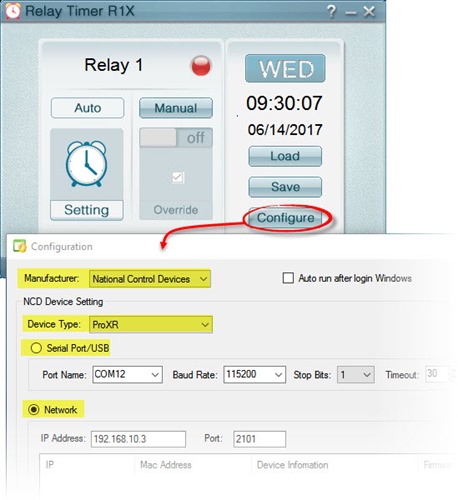
Relay Timer R1X - Configuration

4. Click OK button on Configuration panel. You will see the connection information about the relay board and a flashing arrow shown on the status bar. That means the ProXR relay board has been connected with Relay Timer R1X software.
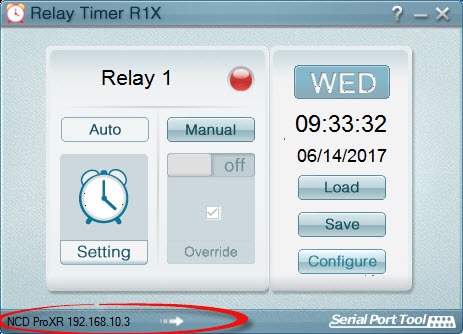
Relay Timer R1X - Connection status

5. It’s ready to control the relay board manually with Relay Timer R1X.

  • Click Manual button down to step into manual control mode
  • Click  On/Off slider to control relay manually

Relay Timer R1X - Control Relay Manually

6. Click Setting button to set up timing schedule for auto control.

Relay Timer R1X - Timing Shcedule Setting

Relay Timer R1X - Shcedule Setting

7. Click Auto button to make sure the relay channel step into auto control mode. The relay channel will be turned on/off automatically according to above schedule setting.

Relay Timer R1X - Switch to Auto Control Mode

8. You can also click Override button to select option for switching to auto mode automatically.
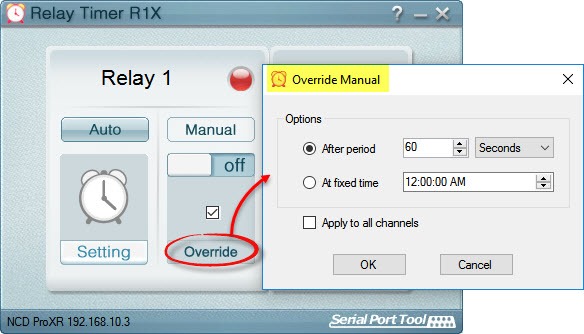
Relay Timer R1X - Override Manual

Here is the quick start guide video for how to control 1-channel ProXR relay board with Relay Timer R1X.

See Also:

Control 2-channel ProXR Relay Board with Relay Timer R2X

Control 2-Channel ProXR Relay Board with Quick Timer R2X

What’s the difference between Relay Timer series and Quick Timer series

Control 2-channel ProXR Relay Board with Relay Timer R2X

Relay Timer R2X software allows you to control 2-channel ProXR relay board manually and automatically according to timing schedule setting. Here will show you how to control 2-channel ProXR relay board of National Control Devices with Relay Timer R2X software. 1. Plug-in power for 2-channel ProXR relay board, and connect it to your computer through …

Control 4-channel ProXR Relay Board with Relay Timer R4X

Relay Timer R4X software allows you to control 4-channel ProXR relay board manually and automatically according to timing schedule setting. Here will show you how to control 4-channel ProXR relay board of National Control Devices with Relay Timer R4X software. 1. Plug-in power for 4-channel ProXR relay board, and connect it to your computer through …

Control 16-channel ProXR Relay Board with Relay Timer R16X

Relay Timer R16X software allows you to control 16-channel ProXR relay board manually and automatically according to timing schedule setting. Here will show you how to control 16-channel ProXR relay board of National Control Devices with Relay Timer R16X software. 1. Plug-in power for 16-channel ProXR relay board, and connect it to your computer through …

Control K8090/VM8090 with Relay Timer R8X

There are several ways to control Velleman K8090/VM8090 8-Channel USB Relay card: If  you just want to simply turn on and turn off relay channels,  Velleman K8090/VM8090 demo application is a nice tool. If you plan to have you own control application for K8090/VM8090, you can test the relay control commands with Comm Operator software …

Control Multiple Relay Boards with Relay Timer Software

Relay Timer is programmable timer software to control relay boards. It supports to connect and control multiple relay boards of National Control Devices, Robot Electronics and Velleman. Each relay board has a separate control panel with 16 relay channels. Powerful schedule setting make it much more easy to control relays manually and automatically. Here will …

Control 8-channel ProXR Relay Board with Relay Timer R8X

Relay Timer R8X software is special timer software to control relay controller board. It supports relay boards of National Control Devices, Robot Electronics and Velleman K8090/VM8090. Here will show you how to control 8-channel ProXR relay board of National Control Devices with Relay Timer R8X. 1. Plug-in power for 8-channel ProXR relay board, and connect …

What’s the difference between Relay Timer series and Quick Timer series

Common Features 1. Both of Relay Timer series and Quick Timer series are timer software to control relay controller boards. 2. Both of them support relay board of National Control Devices, Robot Electronics and Velleman K8090/VM8090. 3. Both of them support Serial Port/USB and Network connection between relay board and computer. 4. Both of them …

Relay Timer R8X Supports Robot Electronics’ Relay Board

Relay Timer R8X is programmable timer software to control relay and set timing features of the relay. It works with relay controller boards of National Control Devices. The new released Relay Timer R8X v2.5 supports 8-channel relay boards of Robot Electronics also. It works well with both  Robot Electronics’  USB-OPTO-RLY88 and USB –RLY16L 8-channel relay …

Relay Timer R8X Supports Velleman K8090/VM8090 Relay Card

Relay Timer R8X is programmable timer software to control relay and set timing features of the relay. It works with relay controller boards of National Control Devices. The new released Relay Timer R8X v2.5 supports Velleman K8090/VM8090 8-channel USB relay card also.   See Also: Vellman VM8090    Velleman K8090 Relay Timer R8X Supports Robot Electronics’ …